
The most intuitive and customisable Orientation manager for Android.
This 7 days trial version allows you to fully evaluate the app and if you are fully satisfied then, you can buy Rotation Key from Play store for unlimited usage.
ABOUT:-
Rotation – An Orientation Manager is a tool to control device orientation. It offers all the modes that Android supports and you can also override each app settings to rotate according to your need. It doesn’t matters that app has that mode, it completely overrides the app and system settings. Let’s give it a try and it also has lots of other useful features.
FEATURES:-
Offers a bunch of features and settings so that you can use according to your need and style.
Supported modes:-
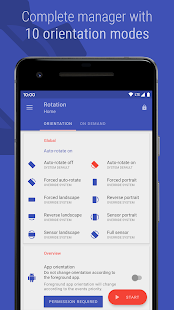
System default modes
* Auto-Rotate On
* Auto-Rotate Off
Other modes to override system settings
* Forced Auto-Rotate
* Forced Portrait
* Forced Landscape
* Reverse Portrait
* Reverse Landscape
* Sensor Landscape
* Forced Full Sensor
Lock Current:- Automatically lock current device orientation
Per App Settings:-
* Select Orientation for individual apps
* Override Lock screen orientation
* Control Phone call orientation
Rotate on demand:-
* Rotate apps whenever you want. Extend the functionality of Per App Settings with ease of access
* Floating head:- A head remains on top of every app. Use it to change foreground app orientation. Single tap, Double tap, Drag and Long press & Drag to perform different actions
* Quick notification:- Change orientation of foreground app from notification
Notifications:-
* Enable notifications for uninterrupted service
* Select notification click action
* Add toggles in notification to change orientation quickly
Widgets:-
* Fully customisable widgets with lock screen support (Android 4.2.2+)
* Service widget: To quickly toggle service
* Mode widget: To quickly toggle between two selected modes
* Dynamic widget: Add toggles according to your need
User Interface:-
* Select from light and dark base themes inspired from Material UI
* Add colours to suit your style via Rotation theme accents. Xperia™ theme accents are also supported
* Choose from two icon sets via default and Inverted style
* Themes will be applied on App, Widgets and Notification toggles
In-built support:-
* Backup and Restore:- Backup your settings and restore in case of failure
* Reset settings within the app
* Restart application if it doesn’t behave properly
* You can report bug via email
Other features:-
* Start on boot:- Start rotation service on boot
* Vibration:- To notify when screen orientation changes with customisable vibration length
* Help and Info:- Detailed info about orientation mode and easy to understand Tutorial
* Uninstall option within the app
PERMISSIONS:-
GET_TASKS :- To retrieve the currently running app
CHANGE_CONFIGURATION:- To change system configuration
WRITE_SETTINGS:- To change system orientation settings
SYSTEM_ALERT_WINDOW:- To change foreground orientation
RECEIVE_BOOT_COMPLETED:- To start service when device boots up
VIBRATE:- To vibrate device when orientation changes
WRITE_EXTERNAL_STORAGE:- To create or restore backu
What’s New
– Improved notification and stability
Preparing for a reboot! Till then, enjoy all new Rotation.
Most features are FREE forever!
Tips
* Use Rotate on demand to learn hidden apps (set any orientation) to make them visible in Per App Settings
* Lollipop: Enable Rotation from App usage settings OR Advance settings — Advanced algorithm — Permission
* Go to Rotation > Per App Settings > Rotation and select Behind orientation so that there will be no conflict with your other apps.
Android is a registered trademark of Google Inc.
Xperia™ is a registered trademark of Sony Mobile Communications AB
Trial Limitations Removed,No Key Needed
Screenshots


Downloads
Older Version